Problems
Conflicts were easy to miss during schedule creation
The core challenge was to surface conflicts at the right moment without slowing down the scheduling workflow.
Scheduling conflicts were not always visible while building schedules. Managers often had to manually review shifts or discovered issues only after the schedule was finalized.
Common conflicts included:
- overlapping shifts
- conflicts with approved time off
- exceeding work hour limits
Because these issues appeared late, managers had to re-check schedules, adjust shifts manually, and communicate changes back to employees.
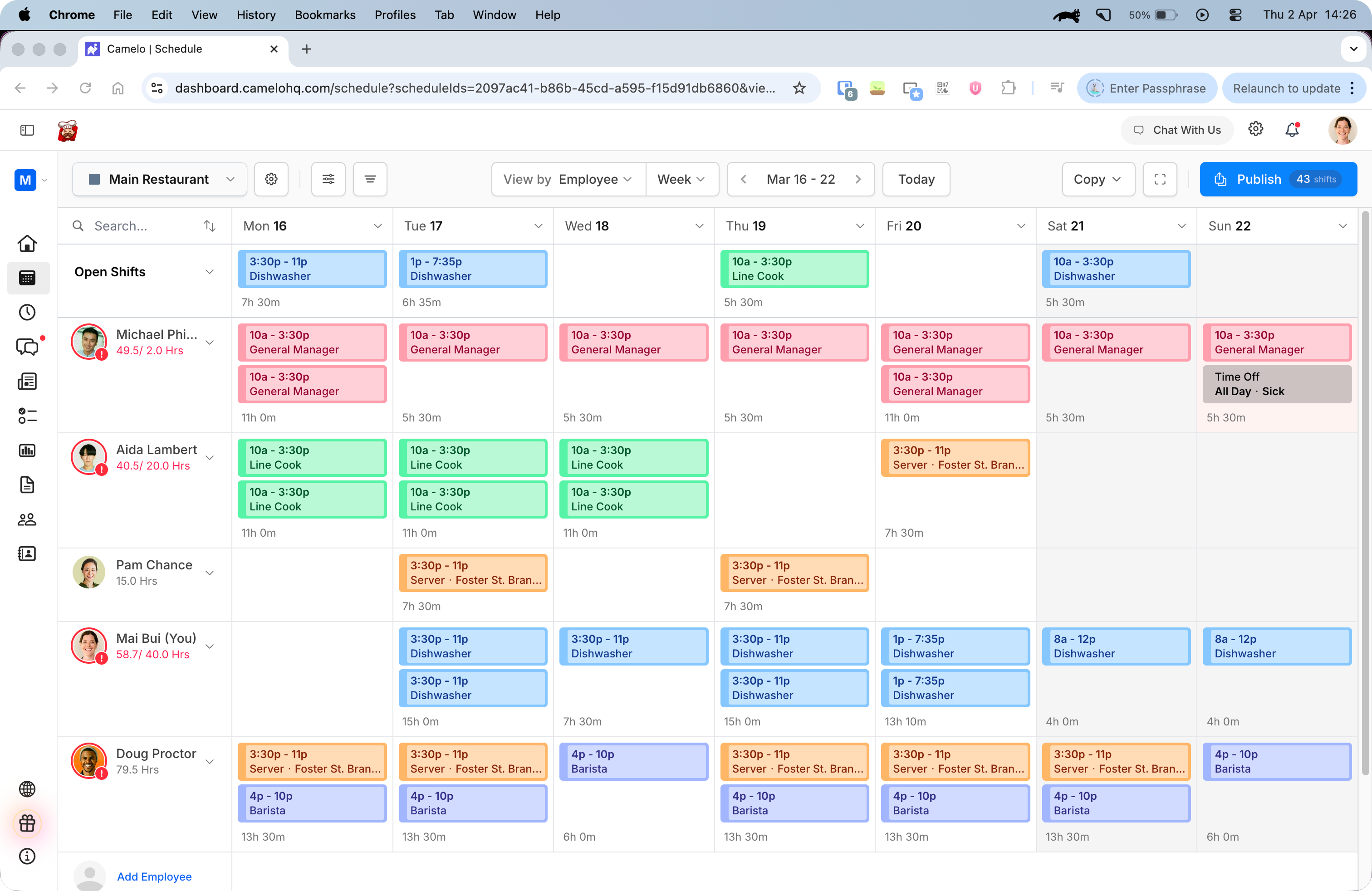
Before: Conflicts were not clearly visible while building schedules.
Design goals
Make conflicts visible without interrupting scheduling
- Surface potential conflicts during schedule creation
- Help managers quickly understand what is wrong
- Allow flexibility for real-world decisions
- Avoid adding extra steps to the workflow

Before: There weren’t enough visible warnings on the schedule to help managers resolve conflicts as they plan workplace schedules.
Exploration
Narrowing scope and finding the right display
Scoping conflict types for v1 — The app already supported several conflict rules (overtime, max hours per day and week, max shifts, max consecutive days). Rather than building warnings for all of them at once, I worked with the team to identify which were already enforced in the app and which we could realistically surface in a first version.
Displaying warnings without clutter — With potentially many conflicts on a single schedule, I explored how to show warning indicators without overwhelming the interface. This included where to place markers, how to aggregate all conflicts in one view, and whether managers should be able to toggle warning visibility on and off.
Scoping quick resolution — Several resolution paths were considered. For v1, we kept it simple: allow managers to quickly delete a conflicting shift or time-off entry directly from the warning. More complex actions were deferred.
Earlier touchpoints — I also explored surfacing conflicts earlier in the workflow — for example, warning inside the shift creation form before a conflict is committed, or adding a confirmation step when publishing a schedule to confirm it’s conflict-free.
Solution
Surface conflicts directly inside the scheduling workflow
I designed a warning system that automatically detects scheduling conflicts and surfaces them directly within the schedule interface.
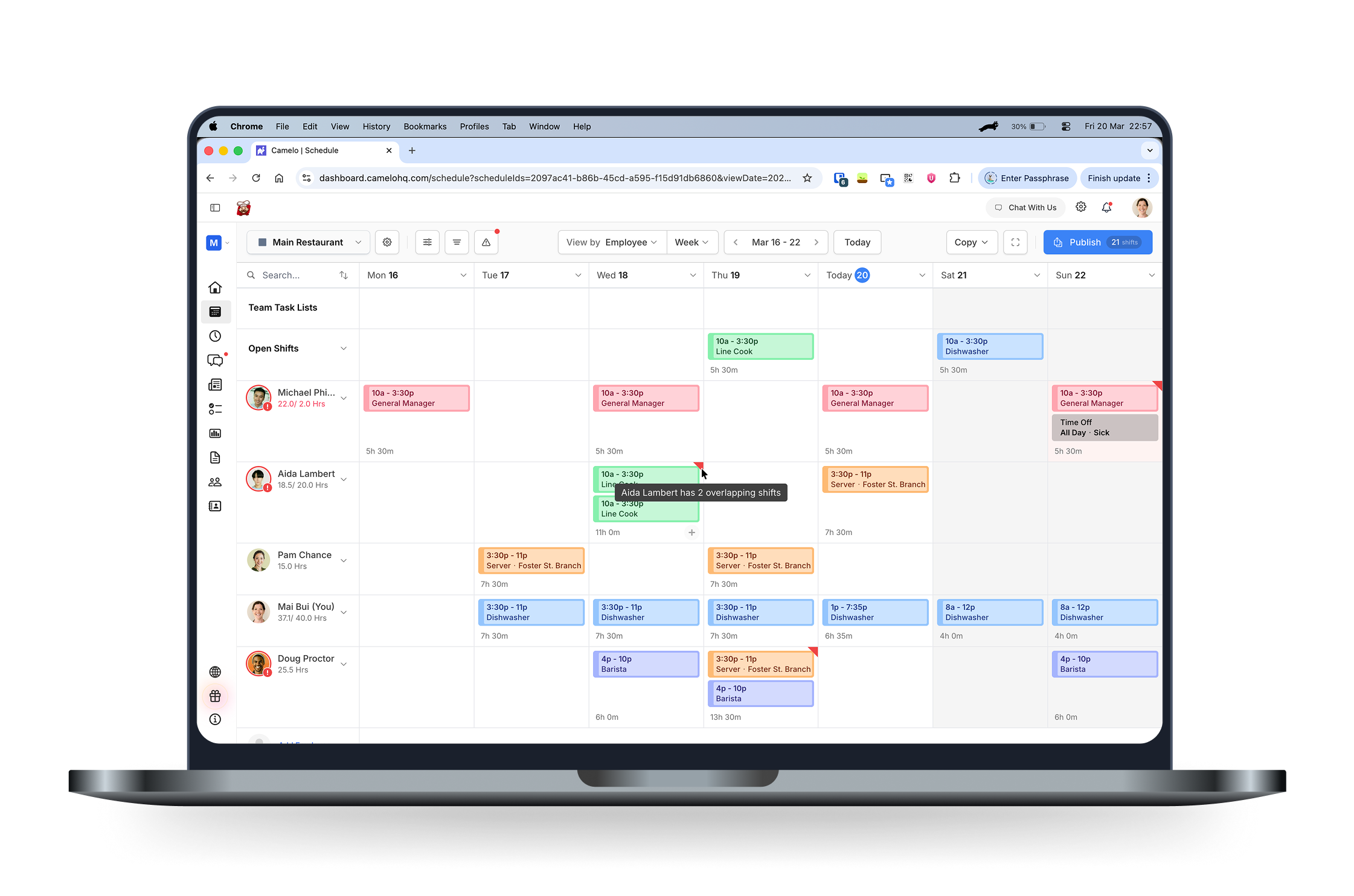
Warnings appear inline next to affected shifts, helping managers identify issues while editing.
A Conflict drawer provides a centralized overview of all detected issues, allowing managers to quickly review remaining conflicts before publishing.
This combination supports both quick fixes during editing and a final review step.

Warnings appear inline next to affected shifts during schedule editing.
Key design decisions
Warn early, review widely, resolve fast
Show real-time warnings directly on the schedule
Warnings appear inline within the scheduling interface, so managers can see issues while editing shifts. This reduces the need to run separate checks or review schedules later.
Provide a schedule-wide conflict overview
While inline warnings help during editing, managers also needed a way to confirm that no issues were missed.
The Conflict drawer lists all detected conflicts in one place and allows quick navigation to affected shifts.
This supports both detailed editing and high-level review before publishing.
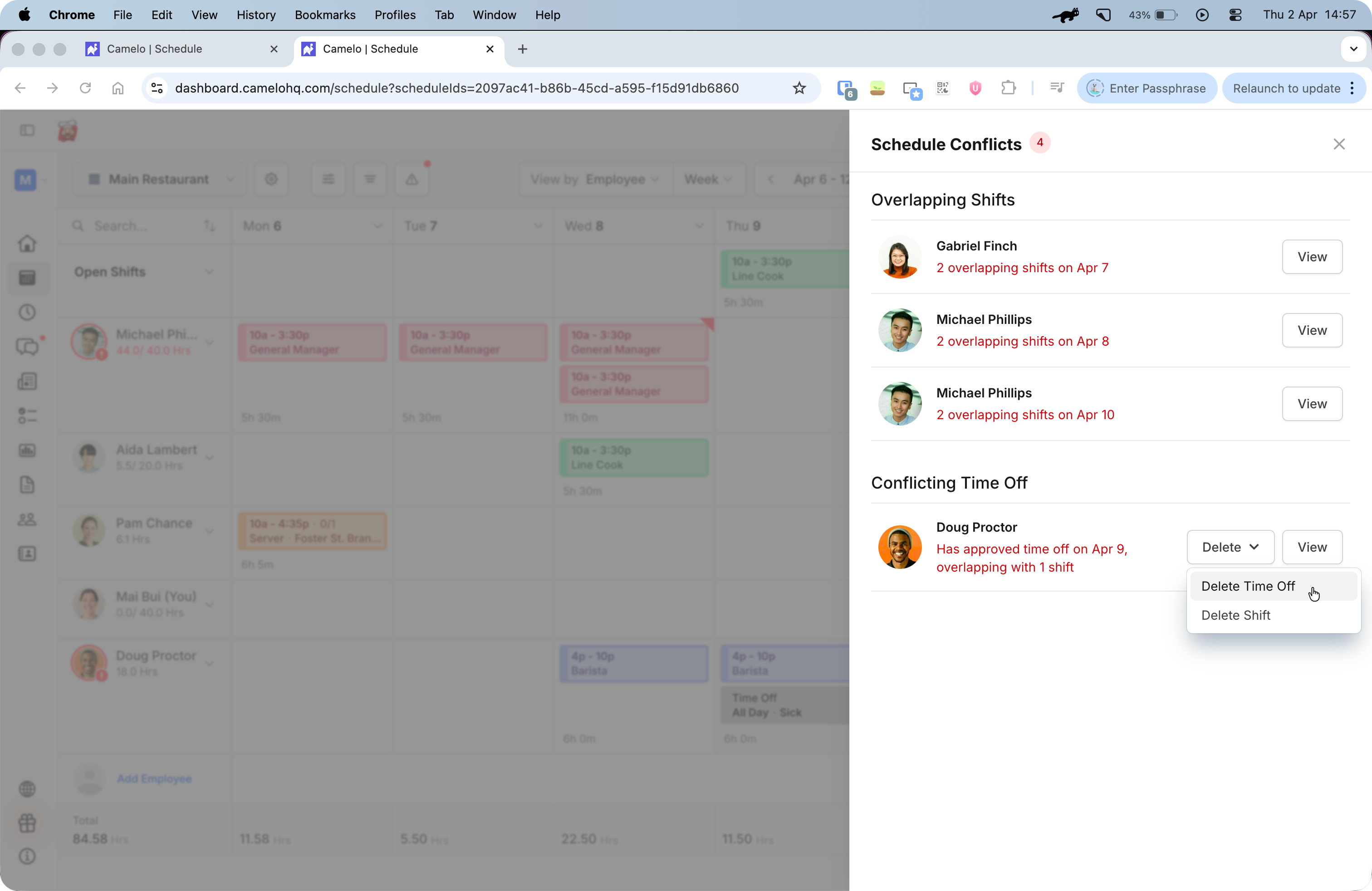
Provides an overview of all scheduling issues across the schedule. This allows managers to quickly review remaining conflicts in one place and navigate directly to the affected shifts.
Image: conflict drawer open
Caption: Managers can review all conflicts and jump directly to affected shifts.
Short video: click conflict → navigate to shift.
Support quick resolution
Warnings appear close to the affected shifts and include clear explanations so managers can immediately take action.
Managers can adjust shift times, remove assignments, or keep the schedule as-is depending on the situation.
The system informs decisions without blocking progress.
Managers can quickly delete conflicting shifts or time off to resolve conflicts.
Challenges
Designing for real-world scheduling complexity
A few edge cases shaped how the system works:
-
Conflicts across multiple schedules: When a conflict involved shifts from different schedules, the warning tooltip shows which schedules are affected so managers have enough context to act. Quick resolution across schedules was scoped out and deferred to a future iteration.
-
Warning visibility: We limited warnings to users with management permissions. Showing conflicts to employees could create confusion or anxiety before a schedule is finalized.
Impact
Earlier detection, fewer last-minute fixes
The warning system helps managers identify conflicts earlier in the scheduling process and resolve issues before publishing.
- 65% of managers interacted with warnings while creating schedules.
- Conflicts were identified earlier in the workflow.
- Reduced manual corrections after schedules were published.
“The quick view and delete option for schedule conflicts is really useful!” — Zohaib, Manager
Reflections
Information structure shapes decision-making
Key takeaways
- This project highlighted the importance of surfacing potential issues at the right moment in a workflow. Instead of requiring managers to manually review schedules, the system helps make hidden conflicts visible while schedules are being created.
- It also reinforced the value of designing flexible systems. By showing warnings instead of blocking actions, managers can stay informed about potential issues while still maintaining control over scheduling decisions.
What I’d explore next
- Smart scheduling suggestions to help managers resolve conflicts faster — suggest available assignees or better shift times based on availability.
- Customizable warning rules to support different team policies.